Campaign lifecycle
In Randio Open Campaigns Open Campaigns → History
A run moves through a fixed set of phases. The campaign page shows which one it is in.
Upcoming
The run is in the queue with a start time. You can still edit it, move it, or cancel it. About half an hour before the start Randio prepares it: it installs the campaign's catalog page if it is not there yet and, for a Storefront run, builds the guest pool or the login buffer. A run cancelled before it went live leaves no History row.
Preparing
At the start time Randio freezes the strategy the run will use and goes live within about a minute. Outreach catalogs are not built here: each one is drawn when its email is sent, so the draw reflects stock at that moment.
If nothing can be served, the run does not start. The two causes are a strategy with no active products and, for Outreach, a group with nobody reachable. Both are reported on the page; a skipped Outreach run is recorded in History with its reason.
Sending
Outreach only. The run shows Sending soon, then Active (Sending n of m). Emails leave in ten-minute windows within the store's daily limit, each with a link to that customer's own catalog page. Reminders, if the campaign has them, go out after the first emails are done, timed to the run's end; see Reminder emails.
Active
Catalogs serve: the catalog pages resolve, the storefront block shows offers, and the cart applies the catalog prices. The strategy is frozen for the run; an edit to it applies to the next run. The template is not frozen: a change to the template reaches shoppers right away, and the run's page lets you switch it to another template. See Scheduling and duration.
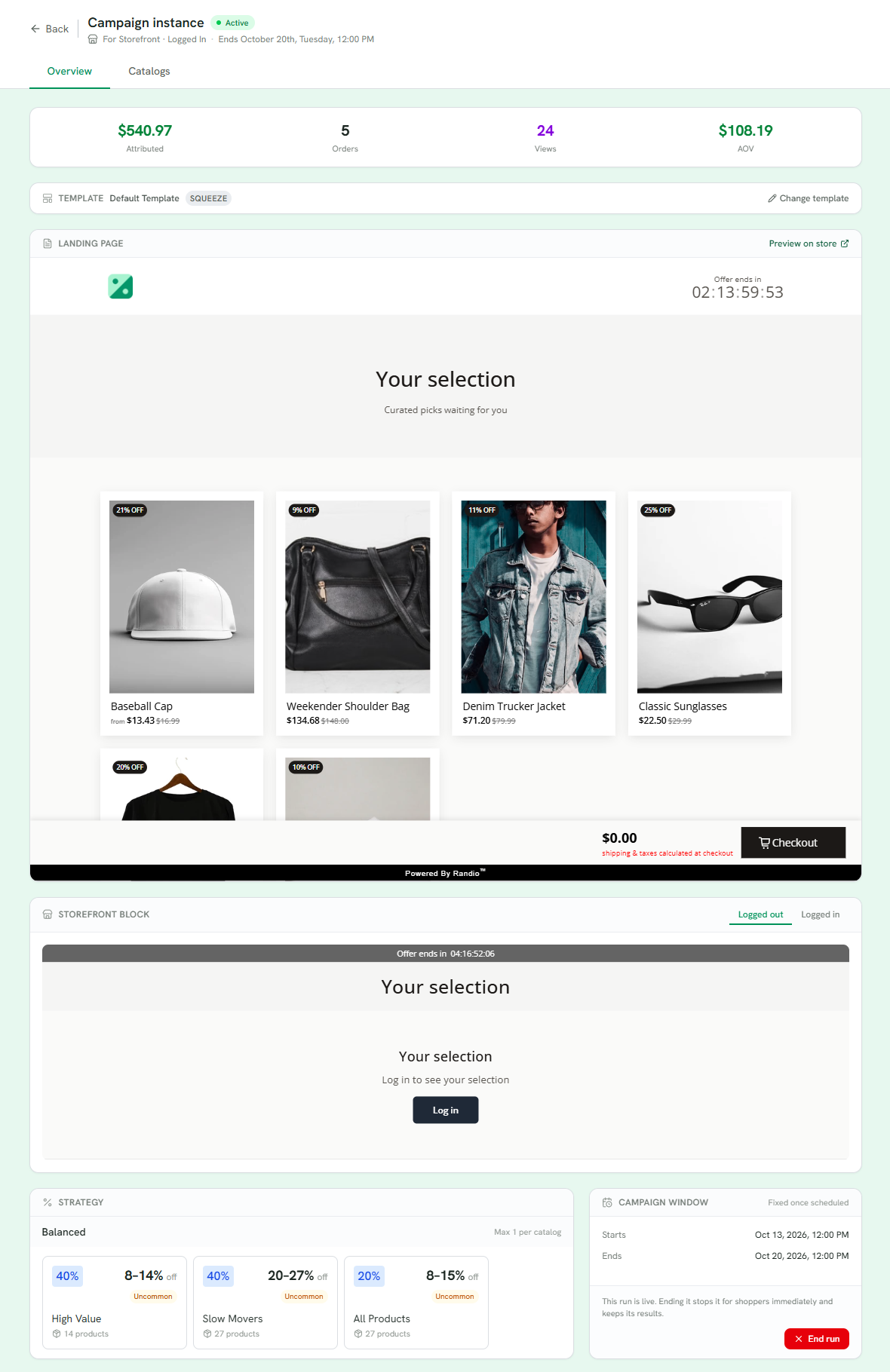
1 What the run has produced so far: attributed revenue, orders, views and order value.
2 The template it serves; Change template switches it for this run.
3 The catalog page, as shoppers see it.
4 The storefront block, signed out and signed in.
5 The strategy, frozen for the run.
6 The run's window. End run stops it for shoppers now and keeps its results.
Ended
At the end time, when you end it early, or when the next run starts, the run's catalogs stop discounting. Items already in a cart stay in the cart at full price; nothing is removed, and if the shopper's next catalog offers the same product, the line takes that catalog's price instead. While the campaign has a next run, an old link shows "This catalog has ended." When the campaign has no run left, its page is removed from your store and old links land on your theme's not-found page. If an automatic rule is on, the next run follows.
History keeps every ended run: who it reached, what it served, and the orders it produced. Deleting the campaign later does not change those records.
Ending early
End run on the run's page ends a live run, and asks whether to stop the schedule as well. Cancel run removes a run that has not gone live. An ended run cannot be resumed; schedule a new one instead.
Related: Putting it all together.