Preferences and inventory rules
In Randio Open Settings → Preferences Open Settings → Inventory
Two Settings tabs hold the rules that apply to every campaign: Preferences for app-wide behaviour and Inventory for which products may appear in a catalog.
Preferences
- Discount Quantity Limit: the maximum units of each product that get the discounted price per customer. It applies to every strategy; a distribution can set its own Max per product, which replaces it for that distribution's products. Catalogs built after a change use the new limit. Units beyond it are charged at full price. See Cart and checkout.
- Customer Enrollment: with Add newly eligible customers to running campaigns on, customers who start matching a running Outreach campaign's group are added daily and sent their email. Off, a running campaign only reaches customers who matched when it sent, and later matches wait for the next run.
- Discount Isolation: not a switch, a guarantee. A Randio price is always the only product discount on a line it touches; Shopify blocks any other product discount there. The card also warns when another app owns your store's cart transform, in which case the discount still applies at checkout but may not show in the cart until that app is removed.
- AI & Machine Learning: an opt-in consent for Randio to use your store's data for catalog distribution optimization, campaign insights and analytics summaries. It is off until you enable it and can be revoked at any time. The page records when you consented.
Inventory
- Minimum Inventory Thresholds: hide a product from catalogs when its stock falls under a number. Product level counts total stock across all variants (1 hides it once it sells out). Variant level hides the whole product when any variant's stock is under the number. Thresholds judge the whole product; Randio never greys out a single size.
- Keep selling when out of stock: lets a product stay in catalogs when its stock is below the threshold, or sold out, but only where Shopify is set to sell it anyway — the product's Inventory section, "Continue selling when out of stock". Both have to be true: this setting on, and that Shopify switch on for the variant. It is not Shopify's Pre-order purchase option (selling plans with a deposit and a fulfilment date), which Randio does not read.
- Exclude Previously Ordered Products: do not offer a customer products they already bought through a Randio campaign, within an exclusion window you set.
- Purchase Limit per Product: how many times a customer may buy the same product through Randio before it is excluded from their future catalogs. This is the re-offer rule, not the checkout unit limit above.
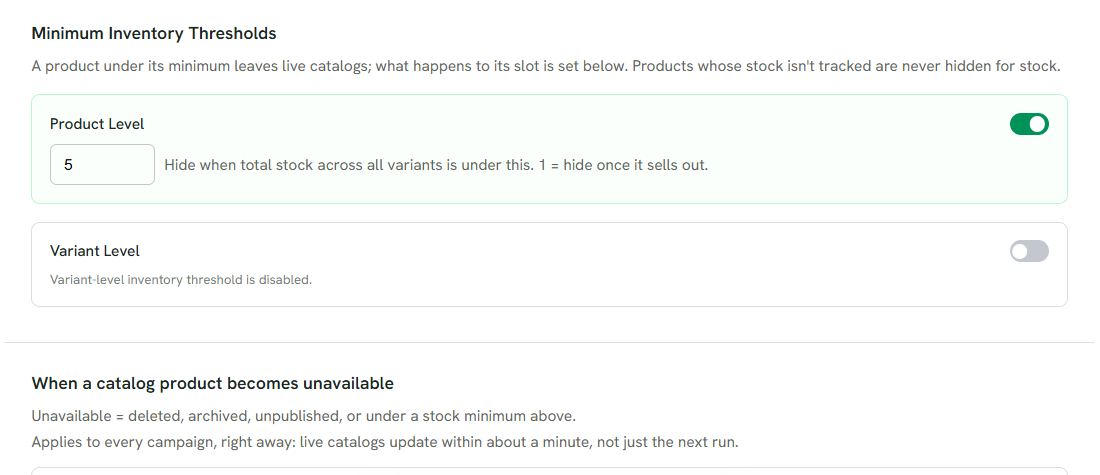
1 Product level: hide a product when its total stock is under the number.
2 Variant level: hide the whole product when any variant is under it.
3 What happens to a slot when a product becomes unavailable mid-run.
Inventory rules apply to every campaign right away. Live catalogs update within about a minute, not only at the next run.
Products that are out of stock, unpublished, gift cards, or not sold in the customer's country are left out regardless of these settings. Products whose stock is not tracked are never hidden for stock.
Related: Sync and theme setup.