What is a strategy
In Randio Open Strategies Open Strategies → New Strategy Open Products → Collections
A strategy is the rule set a catalog is drawn from: which products may appear, the percentage off each one, and how many products a catalog holds. Customers never see its name.
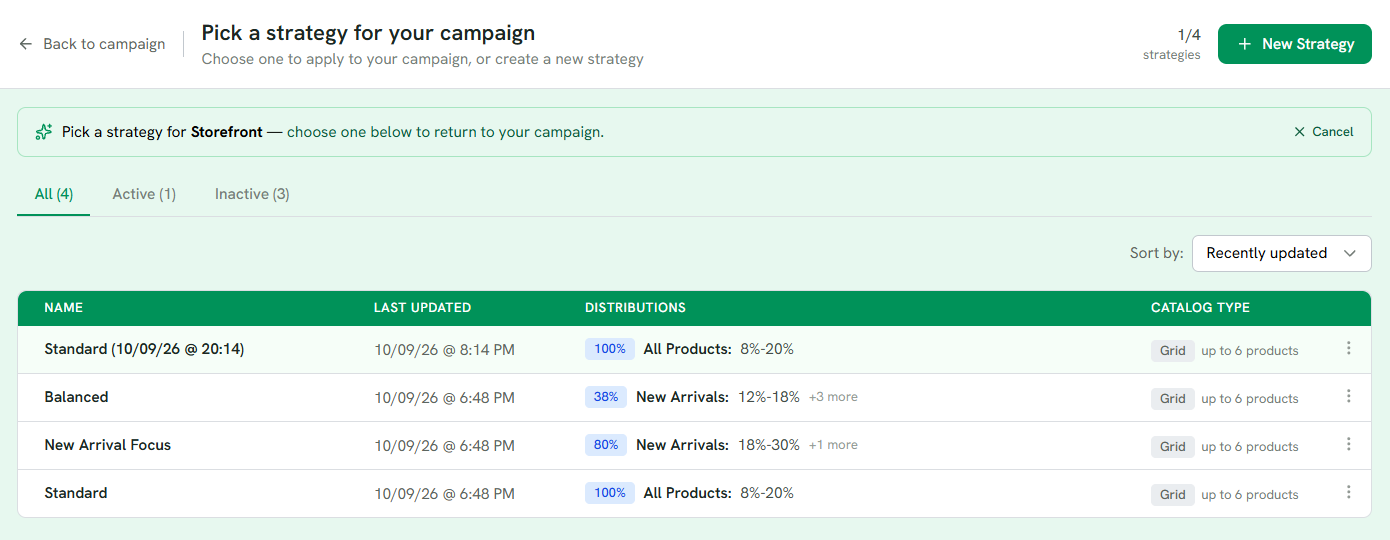
1 Picking from a campaign: choose a row and you return to the campaign with it.
2 Each row sums up its distributions: share, collection and discount.
3 Grid or Single, and how many products a catalog holds.
4 New Strategy offers the ready-made ones or a blank start.
Distributions
A strategy holds up to 8 distributions. Each one draws from a collection or a single product and has its own type and discount.
| Type | What it does | You set |
|---|---|---|
| Guaranteed | Appears in every catalog. For the products you want everyone to see. | Number of products from this pool per catalog |
| Chance | Owns a share of the catalog's remaining slots. At 25% in a six-product catalog, one product from this pool is in every catalog and a second one is in half of them. | Its share, in percent. Shares across all Chance distributions add up to 100% |
| Limited | Appears until it runs out, like limited stock. Best for your deepest discounts. | Products per catalog, and how many customers can receive it |
Guaranteed and Limited products take their places first; Chance distributions fill the rest up to the maximum. Every strategy needs at least one Chance or Guaranteed distribution. Limited alone can leave catalogs empty.
Who receives a Limited distribution depends on the campaign type:
- Outreach: random recipients across the whole run. A recipient's catalog is built when their email is sent, and the draw is spread over everyone the run will reach, so the first emails out are not favoured.
- Storefront, Logged In: decided when a signed-in customer opens their catalog, and paced over the run. Early visitors have a small chance; as the run goes on the chance follows how many visits are still expected, and near the end any wins still unclaimed are handed out rather than lost.
- Storefront, Guest: ignored. Guest catalogs are shared between visitors, so a one-time win cannot be given to one person.
Which type for what
- Guaranteed for a showcase. When a campaign is about something, put it in a Guaranteed distribution so every catalog shows it: a launch, a restock, a new arrival, the product your email talks about.
- Chance for variety. The bulk of most catalogs. Two or three Chance distributions over different collections give each customer a different mix.
- Limited for a draw. A special offer only a few customers receive, like a prize draw: a deeper discount, or a product you have few of, for the number of customers you set. Word your email as a chance, not a promise, since most recipients will not get it. Guest mode does not use it.
For worked combinations, read Distribution types.
Each distribution carries a discount: a fixed percentage, or a range with its own Higher discounts setting. See Discount types and Discount ranges. A distribution can also set its own Max per product, the number of units a customer gets at the discounted price. It replaces the shop-wide limit for that distribution's products.
Where the products come from
A distribution points at one collection or one product. A collection can be one of your Shopify collections (kept in sync with Shopify), one of Randio's own, or a Custom collection you build from rules under Products → Collections. Products that join or leave a collection are picked up by the next run; a run that is live keeps the membership it started with.
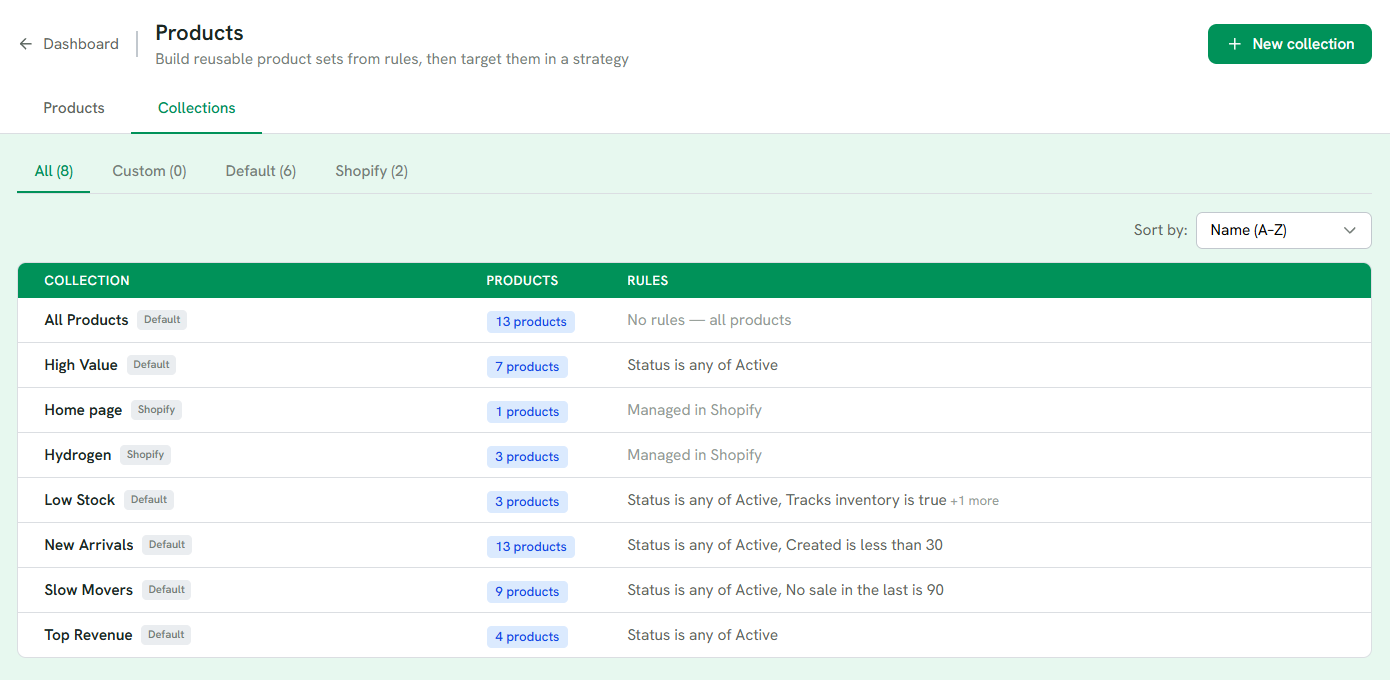
1 Custom collections you built, Randio's own (Default) and the ones synced from Shopify.
2 The rule behind each one; Shopify collections are managed in Shopify.
3 New collection builds one from rules.
Randio's own collections are rebuilt from your store's data and hold at most 50 products each:
| Collection | Holds |
|---|---|
| All Products | Every active product |
| Best Sellers | The top products by units sold, looking further back until at least 5 qualify |
| New Arrivals | Products created in the last 30 days |
| Top Revenue | The top products by revenue in the last 90 days |
| High Value | Products priced at or above your store's median |
| Highest Inventory | The top 10% of in-stock products by stock per variant, once at least 20 qualify |
| Low Stock | Tracked products with 1 to 10 units left |
| Slow Movers | Active products with no sale in 90 days, including products that have never sold |
| Underperformers | Products older than 60 days that have sold in the last 90, in the bottom 25% by units |
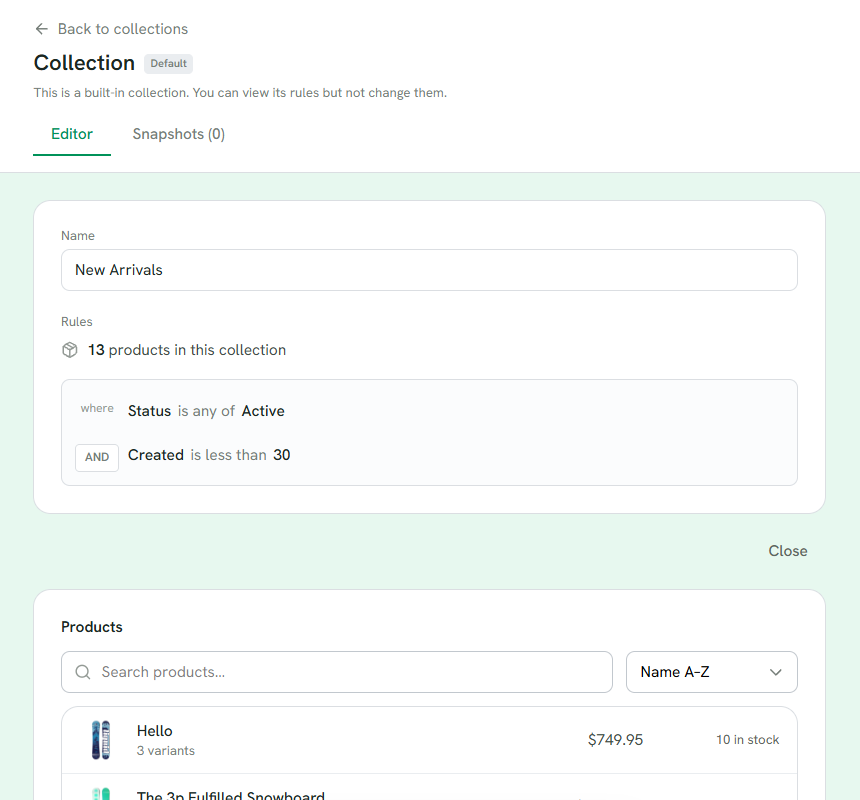
1 The rules, and how many products match right now.
2 The products in it today, with price and stock.
Whatever the collection, a product is left out of catalogs when it is a draft, archived or unpublished, a gift card, sold out (unless it can be pre-ordered and the inventory rule keeps pre-orders), under a stock minimum from Settings → Inventory, not sold in the shopper's country, or already bought through Randio while Exclude Previously Ordered Products is on. See Preferences and inventory rules.
When a product becomes unavailable mid-run
A product can sell out, be unpublished or drop below your stock minimum while catalogs are live. The inventory rule in Settings → Inventory decides what happens to its slot: Remove from catalog, or Replace with another product. A replacement is drawn from the strategy's Chance distributions first, then from a Guaranteed distribution's products the catalog is not already showing; if neither has a spare, the slot stays empty. Live catalogs update within about a minute. A product that comes back into stock returns to its own slot, and a replacement already in place stays.
Settings
- Catalog Type. Grid is a page of multiple products per customer, with Max products from 2 to 12. Single is one product page per customer. Chance distributions fill grid slots up to the max; Guaranteed and Limited quantities are set per distribution. Guaranteed products must fit inside the max together.
- Stock skew. Whether a Chance distribution's draw leans toward products with more stock: Even does not, Balanced leans a little, Inventory leans a lot. Products whose stock is not tracked count as average. Guaranteed and Limited draws are not affected, and neither is each distribution's share. Strategies you build from scratch start on Balanced; ready-made ones start on Even.
- The offer limit (units per product), the re-offer rule and the inventory rules are shop-wide, under Settings → Preferences and Settings → Inventory, and apply to every strategy. Max per product on a distribution is the one exception.
With no Chance distribution, every catalog shows exactly its Guaranteed products and does not fill toward the max.
Starting from a ready-made strategy
After your first sync Randio builds the ready-made strategies your store qualifies for, and New Strategy offers them again at any time: Standard, Sales Velocity Focus, Clearance Focus, New Arrival Focus and Balanced. Each is a set of Chance distributions over Randio's collections, with discounts scaled from your store's own recent discounting: the average discount on order lines from the last 60 days, when at least 20 lines carried one; otherwise 15%.
| Strategy | Built from |
|---|---|
| Standard | All Products at 100%, a range around your norm. The safe default |
| Sales Velocity Focus | Best Sellers 50% at a fixed discount below your norm, Highest Inventory 40% at a range reaching above it, All Products 10% |
| Clearance Focus | Slow Movers 50% at the deepest range, never past 60% off, then Underperformers 20%, Low Stock 20%, All Products 10% |
| New Arrival Focus | New Arrivals 80% at a range above your norm, All Products 20% at a shallow fixed discount |
| Balanced | Best Sellers 20%, New Arrivals 30%, High Value 20%, Slow Movers 20%, All Products 10% |
A strategy whose collections your store does not have yet is shown greyed out, with the reason. When one of its collections is missing, that distribution is dropped and the others' shares are scaled back up to 100%. Clearance Focus is held back while Slow Movers covers more than half of your active products, because on a store with little order history it would discount nearly everything. You can change anything afterwards. A strategy still in Draft cannot be used in a campaign.
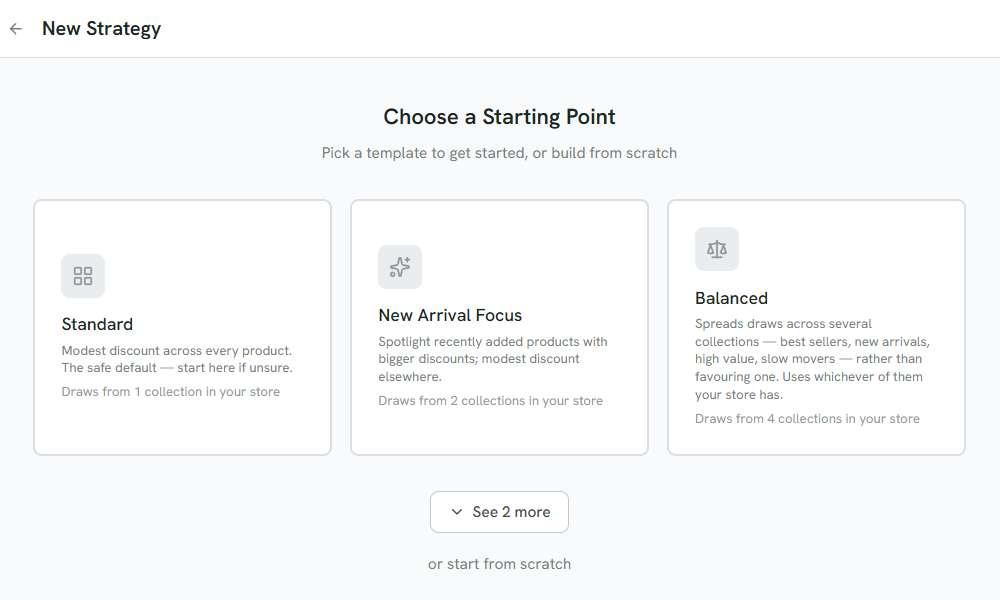
1 Ready-made strategies, each built from your own collections and sales data.
2 See 2 more shows Clearance Focus and Balanced.
3 Or start from scratch with your own distributions.
Editing and deleting
A run keeps the strategy as it was when the run started, or when Randio prepared the run shortly before its start. Edits reach the next run. The one exception is a Guest campaign's shared pool, which is topped up from the live strategy during the run. Deleting a strategy a campaign uses removes it from your list, but the campaign keeps running on it until you pick a new strategy.
Articles: Strategies, Distribution types, Intentional strategies.