Catalog page layouts
In Randio Open Templates
Every campaign gets a catalog page on your Online Store. The email links to it, the storefront block links to it, and it is where a customer sees their whole selection and adds items to the cart.
Two layouts
The template decides the layout, under its Settings tab.
- Squeeze Page: a standalone page with its own header, footer and cart drawer, and no store navigation. The customer sees only their catalog and the add-to-cart path. Use it when the email is the entry point and you want nothing else competing.
- Integrated: the catalog inside your theme's own layout, with your header and footer. It feels like part of the store. Use it when visitors arrive from the storefront block or from the store itself. In the designer, the Background, Header and Footer sections are hidden for this layout, since the theme owns them.
Both layouts render the same catalog with the same template design. Only the frame differs.
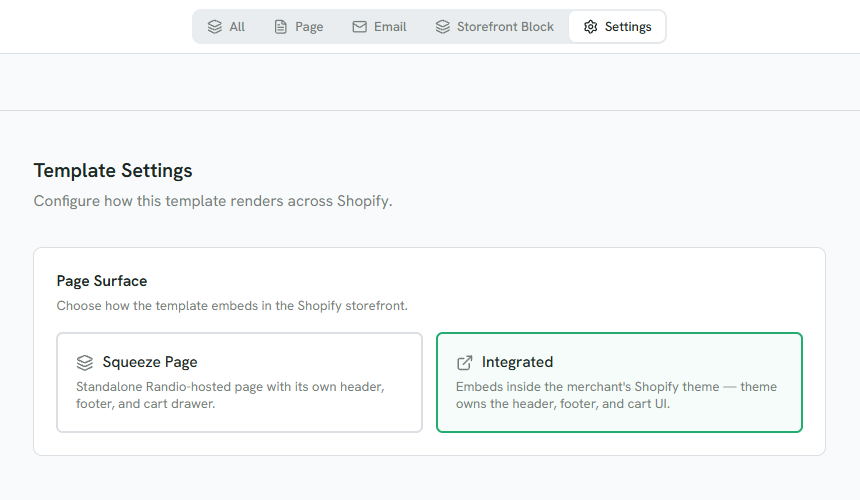
1 Squeeze Page: Randio's own header, footer and cart drawer.
2 Integrated: your theme's header, footer and cart.
What the page needs
Randio's catalog page files serve both layouts, plus two previews the admin uses. Settings → Sync → Theme files lists them: Randio adds only these files and never edits your theme's own files, and nothing is added until you press Sync theme files. The panel reports whether the files are synced, need a sync, have an update available, or were changed outside Randio. Sync installs an update, replaces outside edits, and restores a missing catalog page. Remove these files takes them out again.
Randio creates the page shortly before the campaign's first run, keeps it from run to run, and removes it when the campaign has no run left. You do not create or edit it in Shopify's pages admin.
What a customer sees
- A live catalog: their products, their prices, and the run's end date.
- An ended run, while the campaign has a next run: "This catalog has ended."
- A link that was replaced by a newer run: the newer catalog, when there is one.
- A campaign with no run left: the page is gone, so the link lands on your theme's not-found page.
Previewing
The template editor's store preview renders the saved design as it will appear, with sample products from the strategy you pick. The preview is a local cart page: it shows the design, it does not place orders.
Related: Page templates, Storefront block.