Catalog detail
In Randio Open Customers → Contacts
The catalog page shows one catalog in full. Open it from the customer's Catalog history or from a run's Catalog insights.
Header
Catalog #id with its kind badge (Outreach, Storefront · Login, Storefront · Guest, Preview or Sample) and a summary: how many products, and how many are active, sold, removed or out of stock.
Customer and campaign
The customer card shows the name, email, a Guest marker for a visitor who was not signed in, and when the catalog was assigned. The campaign card shows the campaign's name, type and current status, and whether this catalog is Active or Inactive right now. A catalog is active only while its run is the campaign's current run and has not ended.
Products
One card per product: image, title, price (a range when variants differ) and the percentage off. A grayed image means the product cannot be bought right now.
Each card carries its history as badges:
| Badge | Meaning |
|---|---|
| Purchased | Bought from this catalog, with a count when more than one unit. The orders are listed on the card |
| Replaced | The product took the place of one that became unavailable, or was itself swapped out |
| Removed | Taken out of the catalog by the strategy's rule, or gone from your store |
| No Stock | Sold out while in the catalog |
Purchased cards come first, then live products, then replaced ones, then products that are gone; a sort control changes the order. A purchase keeps a card in front: a removal never undoes a sale.
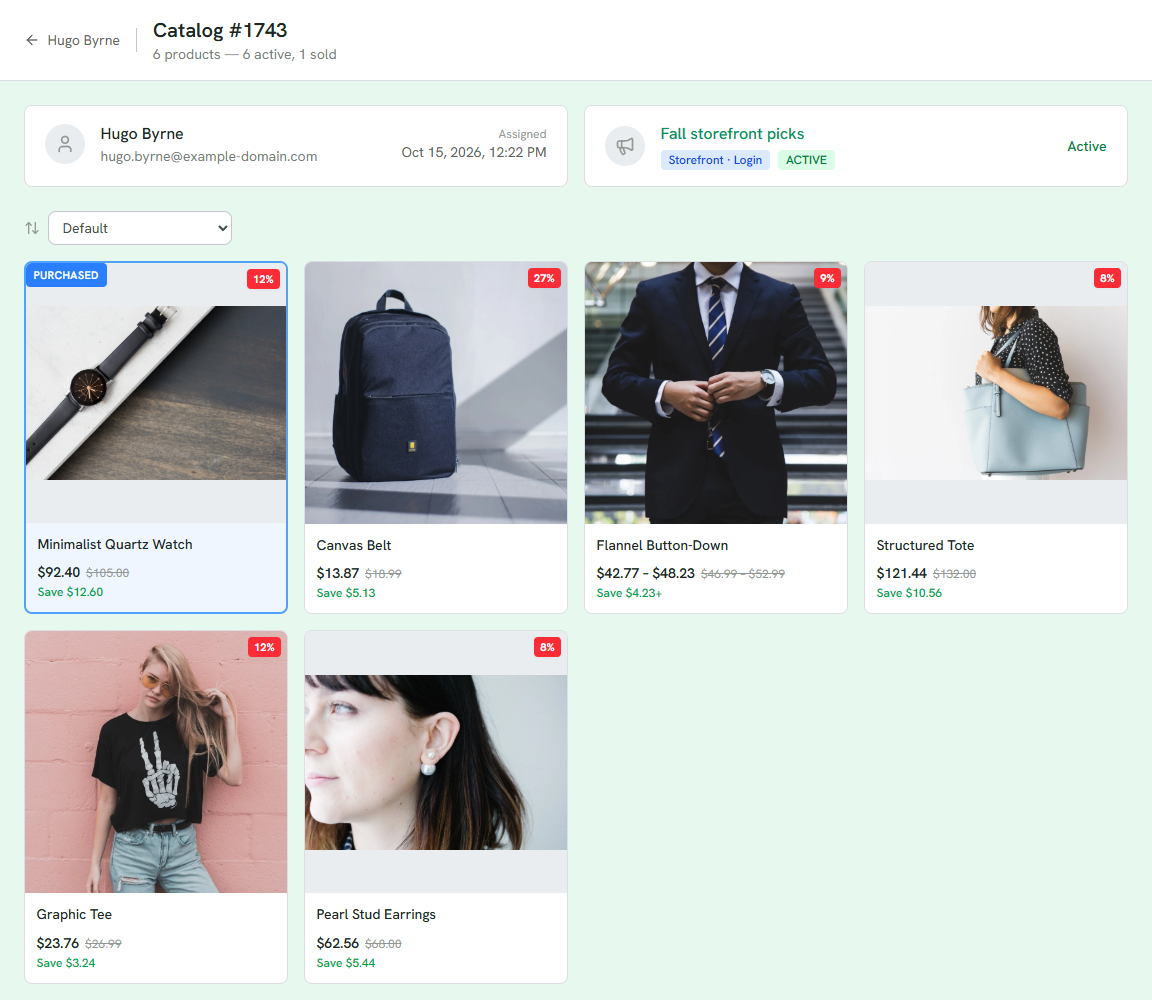
1 How many products, and how many are active, sold, removed or out of stock.
2 Who it was built for, and when.
3 The campaign, and whether this catalog is active now.
4 A purchased card comes first, with its percentage off.
5 The rest of the catalog, each card with its own percentage off.
Guest catalogs
A shared pool catalog is served to many visitors, so its purchases are not one person's. It has no detail page of its own; the order it produced shows it inline.
Doing something about it
From the customer page, Resend campaign email sends the same catalog and link again; no new catalog is created. View their catalog opens this page. To change what a customer is offered next time, change the strategy; a catalog already built is not redrawn.
See Browsing catalogs and Order detail.