Browsing catalogs
In Randio Open Customers → Contacts
A catalog is what one person is offered in one run: a handful of products from the strategy, each with its own percentage off. Every catalog is drawn separately, so two people in the same run see different products at different prices.
Kinds of catalog
| Badge | What it is |
|---|---|
| Outreach | Built for one person in a customer group and sent by email |
| Storefront · Login | A personal catalog for a signed-in customer on your store |
| Storefront · Guest | One of a shared pool served to visitors who are not signed in; many visitors share it |
| Preview, Sample | Catalogs built for the editor and for your own previews. No shopper owns them |
A catalog lives with its run
A catalog discounts only while its run is the campaign's current run and that run has not ended. When the run ends, the catalog stops serving and its prices stop applying at checkout. A customer holds one personal catalog at a time, Outreach or Logged In: someone who already holds a live one is skipped by the next Outreach campaign until it ends.
Products can change during the run. One that sells out, drops under a stock minimum or disappears from your store leaves the catalog and is removed or replaced according to your inventory rule. One the customer buys is marked as purchased and the catalog keeps the record.
Where to find catalogs
There is no separate catalog list. Catalogs are reached from the people and runs they belong to.
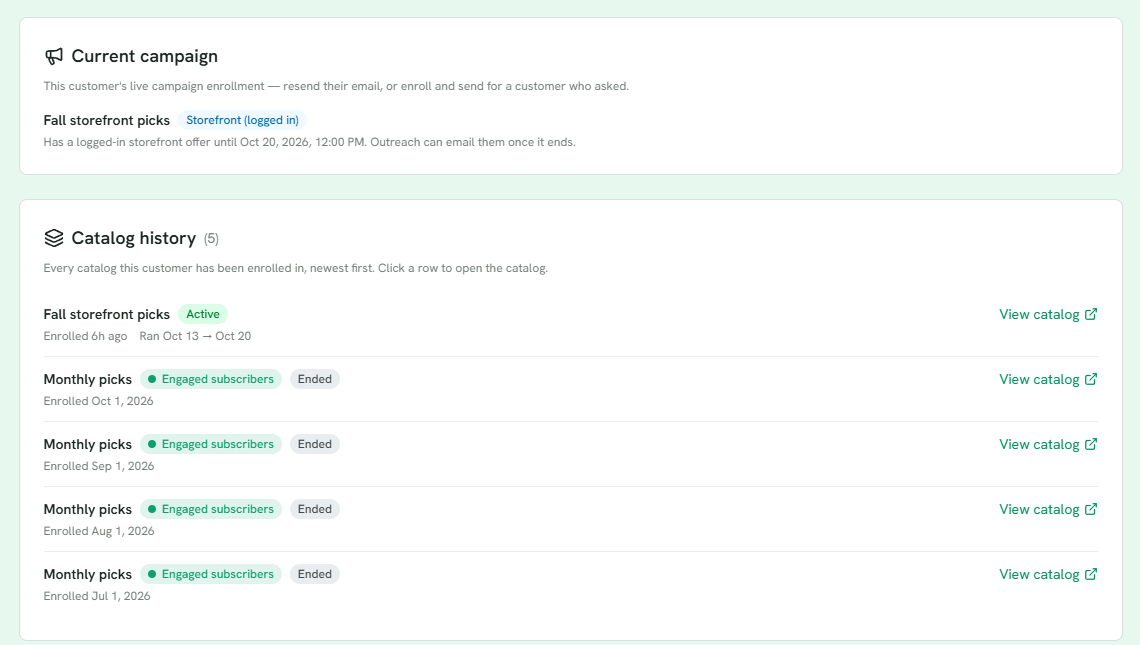
1 Current campaign: the live catalog this customer holds, with the actions to resend or send.
2 Catalog history, newest first: the live catalog is marked Active.
3 Past catalogs stay listed, ended, with the run's group.
- Customer page → Catalog history lists every catalog the customer has been enrolled in, newest first, with when they were enrolled, the run's dates and whether it is active. Click a row to open it. The Current campaign card on the same page offers Resend campaign email, which reuses the existing catalog and link, View their catalog, and, for a customer without one, Create catalog & send.
- Contacts can be filtered to people with an active catalog, and each row's menu offers the same resend and send actions.
- Campaign run → Catalog insights sums up the run: catalogs built, the discount range, the average and median discount, and the most popular products. Generated catalogs below it lists them per shopper, with product count, whether the email was sent, distinct views and orders from that catalog. Shared pool catalogs are counted with their views but not listed, since they are not one shopper's.
- Orders show the catalog an order came from. A guest catalog appears on the order only.
When to look
Open a catalog to check what a customer was offered, to answer "I did not see that product", or to see what sold from it.
See Catalog detail, Order detail and Campaign lifecycle.