How group rules work
In Randio Open Customers → Groups Open Customers → New group Open Customers → Contacts
A group is a set of filter rules. Rules sit in condition groups, up to ten of them with up to ten rules each. Within a condition group the rules match all of these or any of these; the condition groups then combine with and or or. While you edit, the page counts matching customers so you can see the size before you save, and offers presets to start from.
What you can filter on
The fields, by the headings in the editor:
- Orders & Purchases: has made a purchase, order count, orders and revenue in the last 30 or 90 days, lifetime revenue, average order value, days since first or last order, average days between orders, days until the predicted next order.
- Purchases: bought a product, a product tagged, a product type, from a collection, or an order over an amount.
- Behavior: did an event, such as opened or clicked an email, viewed a product or collection, added to cart, abandoned a cart, started checkout or placed an order, at least, at most, exactly or never that many times.
- Engagement: total opens and clicks, days since the last open or click, and engagement tier.
- Marketing: email marketing status, SMS marketing status, and email deliverability (active, soft bounced, hard bounced, complained, unsubscribed).
- Customer Account, Location, Tags and Custom: account age, country, state or province, customer tags, and properties you imported.
Operators depend on the field: equals and doesn't equal, is greater than, less than, at least, at most, between, is in and is not in, is set and is not set, contains, doesn't contain, starts with, ends with, includes any of, includes all of.
Engagement tiers
Randio keeps an engagement tier per customer and the editor shows what each tier means for sending. Engaged customers can be in every campaign. Warm and Cooling customers are emailed less often. Dormant customers are skipped unless a campaign chooses to include cold customers. A customer who was sent five emails and opened none is dormant; a recent click keeps someone engaged, an older one warm, then cooling; someone with no email history is placed by how recently they joined or ordered. Cooldowns remove nobody from the group; the campaign decides whether cold customers are included.
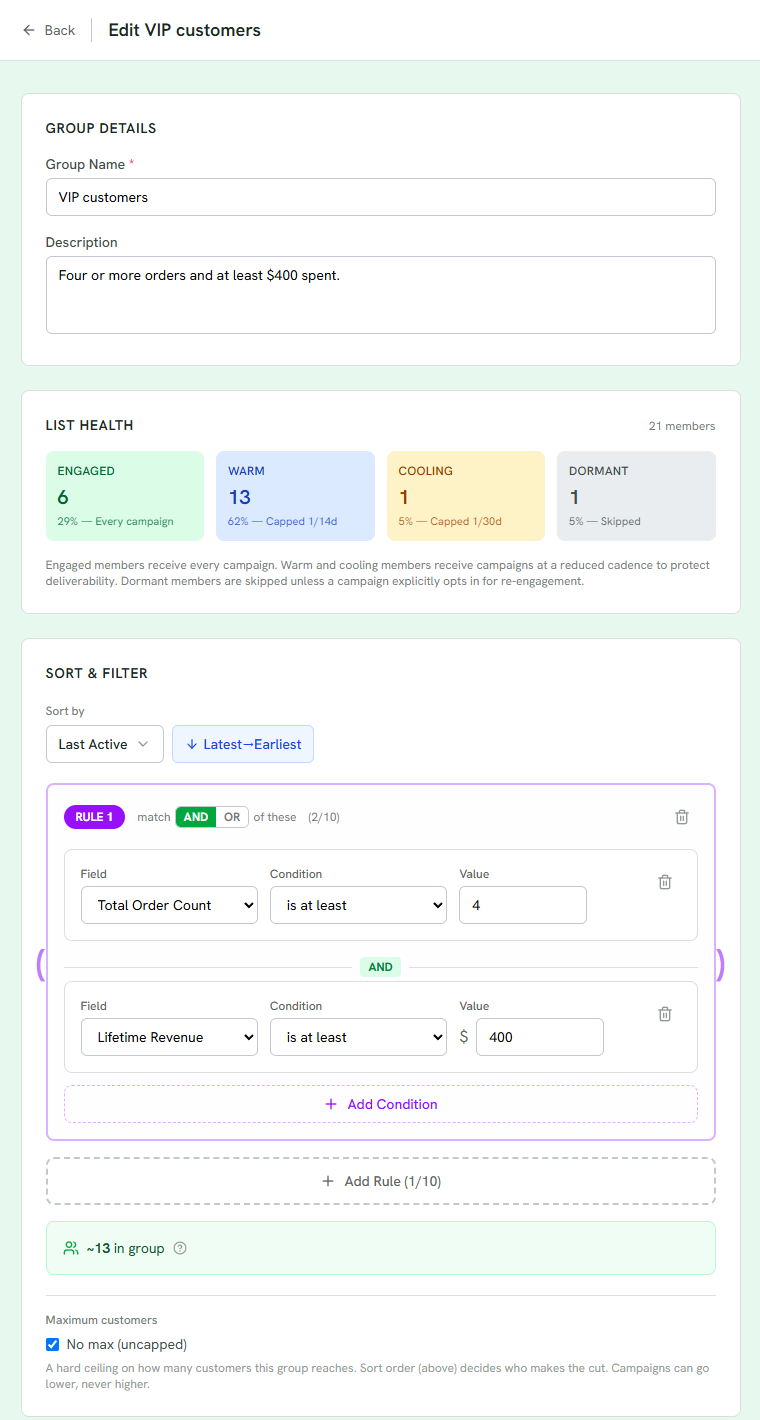
1 List Health: the group's members by engagement tier, and how often each tier is emailed.
2 A rule: field, condition and value. Add conditions to it, or add another rule.
3 The estimate updates as you edit, and counts who a higher group takes first.
4 Maximum customers caps the group; sort order decides who makes the cut.
When rules are evaluated
Rules run against Randio's copy of your data, kept current by Shopify's updates within minutes and by Sync Now for bulk changes. A running Outreach run's audience is fixed when its first wave starts; a customer who starts matching later waits for the next run.
Capping a group
Maximum customers caps a group; the default is no maximum. When more match than the cap allows, the editor's sort rules decide who makes the cut, the estimate shows "capped at N", and the rest become claimable by lower-priority groups. A campaign can cap its own reach too, and the smaller cap wins; its schedule card shows "Sends to about N" with the people held by the storefront.
Related: What is a customer group.