Order detail
In Randio Open Orders
The order detail page explains one order: which campaign produced it, what was discounted, and what the customer saved. View in Shopify opens the same order in your Shopify admin.
What you see
- Campaigns: the campaign and run the order came from, marked Outreach or Storefront and, for Storefront, whether it served logged-in customers or guests, with the catalog it came from: active or inactive, when it was created and when it expires. A customer's catalog is linked; a guest pool catalog is shown inline. "Randio discount · unattributed" means a discount applied but the order could not be linked to a run; such orders are listed but not counted in analytics.
- Customer: who placed it, with a link to their customer page and their catalogs.
- Products: each line with its discount. "Limit: N of M discounted" means the customer bought more units than the per-product limit; the extra units were charged at full price. "No discount applied" marks a line that was in the cart but not in the catalog.
- Totals: subtotal, subtotal after discounts, shipping, other fees, tax, the total, and total savings.
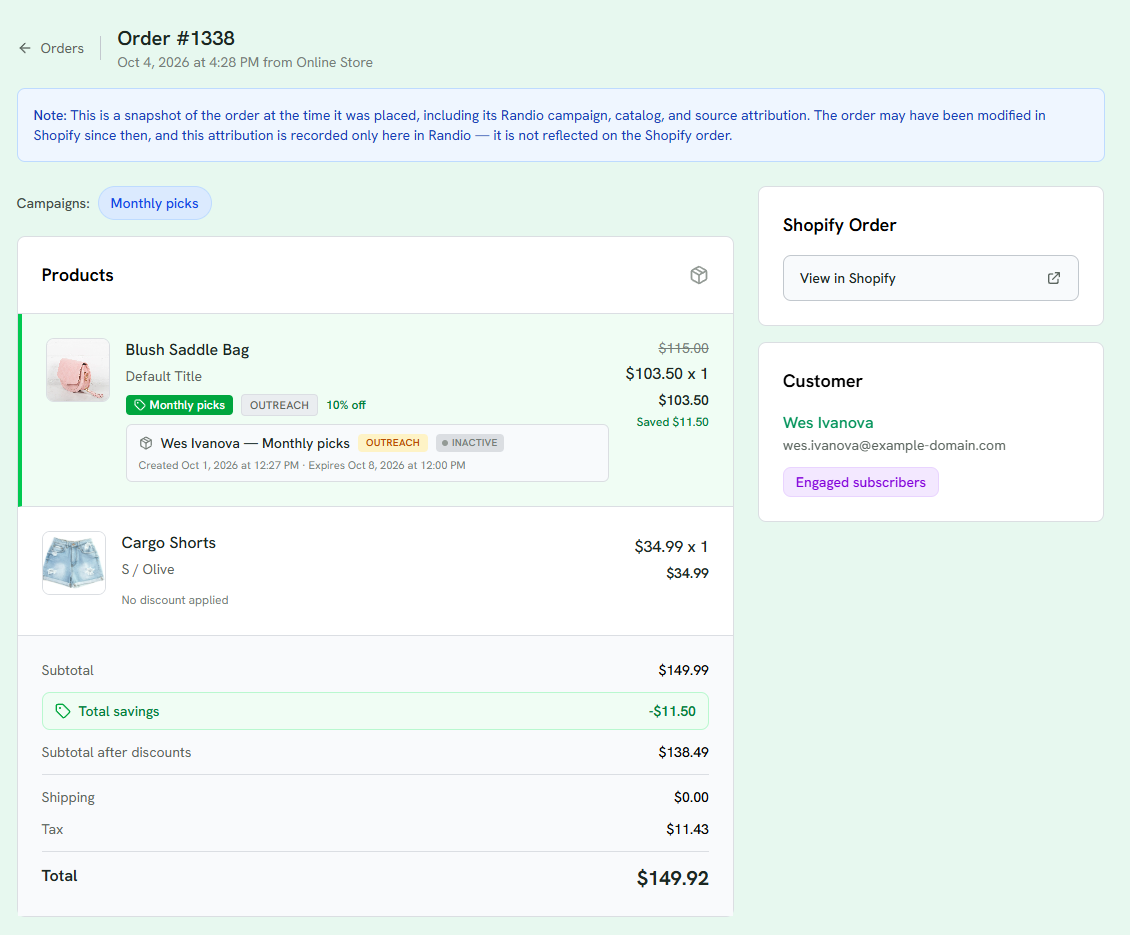
1 A snapshot of the order as placed.
2 The campaign the order came from.
3 A discounted line: its campaign, the percentage off, the catalog it came from, and what was saved.
4 A line that was in the cart but not in the catalog: no discount applied.
5 Totals, with the total saved.
6 The customer and their group.
A snapshot, not a mirror
The page shows the order as it was placed. Refunds, cancellations and edits made later in Shopify are not reflected here, and revenue elsewhere in Randio is not reduced by them. Shopify remains the record for the order's current state.
Why a line was not discounted
Usually one of: the unit was over the per-product limit; the product was not in that customer's catalog, or was added from the theme's own product page rather than the catalog; the run had already ended when the order was placed; the product is a gift card; or the cart app embed was off at the time. Cart and checkout walks through the checks.
Related: Orders, analytics and products.