Scheduling and duration
In Randio Open Campaigns Open Campaigns → New campaign
Every run has a start and an end. The campaign page offers two ways to set them.
Manual runs
Schedule a manual campaign asks for a window in your store's timezone: a start in the future and an end at least a day after it and at most 30 days after it. Save books the run; with Start set to Now, Save & start now begins it as soon as you save. A window cannot overlap another manual run or the run that is live; a slot already booked is marked and cannot be chosen. A manual run may take a slot the automatic rule had planned, and the rule picks up again afterwards.
On the campaign page, Start now on the Up next card starts a queued run early.
Use manual runs for dated moments: a launch weekend, a holiday, early access before a sale. Use automatic scheduling for a steady rhythm, such as a fresh set of picks each week. The two combine: a manual run takes its slot and the rotation carries on around it.
Automatic scheduling
Set up automatic scheduling saves a standing rule: the strategy and template rows to use, a Rotation (every week, every other week or every month), the day and time, and how long each run's discount lasts, which can be at most 7, 14 or 30 days for those three rotations. The page works out when the first run begins and which dates the rotation covers. When a run is already live, saving asks whether to keep the schedule, start now, or schedule only; Save & replace current ends the live run and starts a fresh one with the new settings. The replaced run keeps its record.
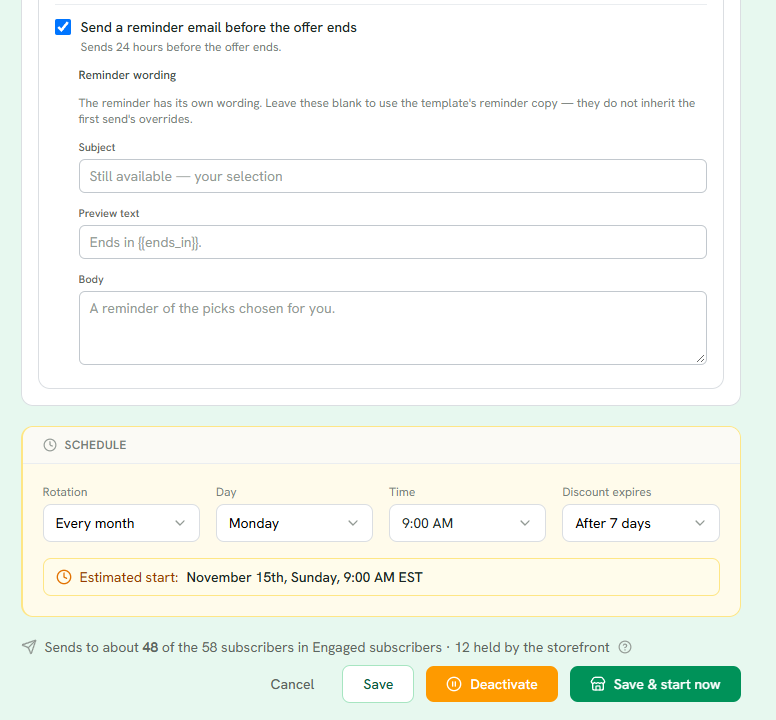
1 Send a reminder email before the offer ends, one per run, with its own wording if you want it.
2 Rotation, day, time and how long each run's discount lasts. The estimated first start updates as you change them.
3 How many of the group the next run will reach, and how many are held by the storefront.
4 Save & start now begins the first run immediately. Save alone keeps the schedule for its first slot.
Manual runs and the rotation share the same queue. A manual run inside the rotation's window replaces that cycle, and the rotation picks up after it.
Turning the rule off (Deactivate) stops new automatic runs from being created. Runs already committed, manual ones and any automatic run already minted, keep their dates. The rule itself is kept, so turning it back on resumes the rotation.
How often to run
A starting point: offer two to three times as often as your customers order. If a typical customer orders about every two months, a run every three to four weeks fits; customers who buy every few weeks suit a weekly rotation. The group rule average days between orders sorts customers by how often they buy, so each group can have its own campaign and its own rotation.
For Outreach, each customer's email tier also paces sends: Engaged customers get every run, while Warm and Cooling customers are capped to fewer emails (Customer Groups → a group's List Health shows the caps). A weekly Outreach rotation therefore reaches your engaged customers every week and the rest less often. Storefront runs send no email, so a weekly rotation simply refreshes what visitors see each week.
How long a run lasts
A run ends at its end time, or earlier when the next run starts: two runs never serve at once, and a run cut short is marked "Ended early" in History. About half an hour before a run starts, Randio prepares it: its catalog page, and for a Storefront run the shared pool or the login buffer. From then on the run is locked in; cancel it from the queue if you change your mind.
For the reasoning behind run lengths and send frequency, read Campaign cadence.
Sending capacity
An Outreach run sends to about the number shown on the schedule card, not the whole group. The count leaves out customers who cannot be emailed and customers holding another campaign's live catalog. A campaign can cap its own reach (Maximum customers); the group's cap applies too, and the smaller of the two wins. Your store also has a daily send limit, shown on Settings → Preferences, that grows as you keep sending cleanly, with few bounces and no spam complaints. When a window supports fewer recipients than the group holds, the most engaged customers go first and the rest wait.
Large groups therefore go out over several days inside the run. Catalogs count on your bill when their email is sent. See Budgeting a cycle.
Related: Campaign lifecycle.